Server-to-Server (S2S)
Optimise's S2S tracking consists of two components, and is our most robust solution for campaign tracking:
- Event Tag – Add to every page along your campaign's journey.
- Conversion Postback – Add to the post-sale confirmation page of your campaign's journey.
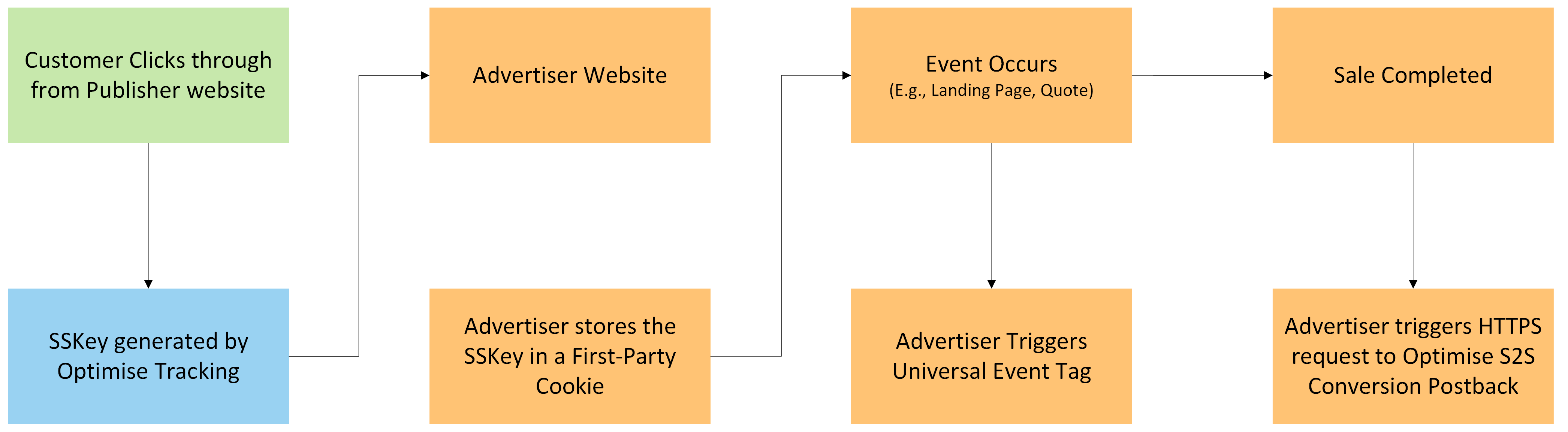
If your journey changes domains at any point, please review the flow chart below:
S2S cross-domain tracking
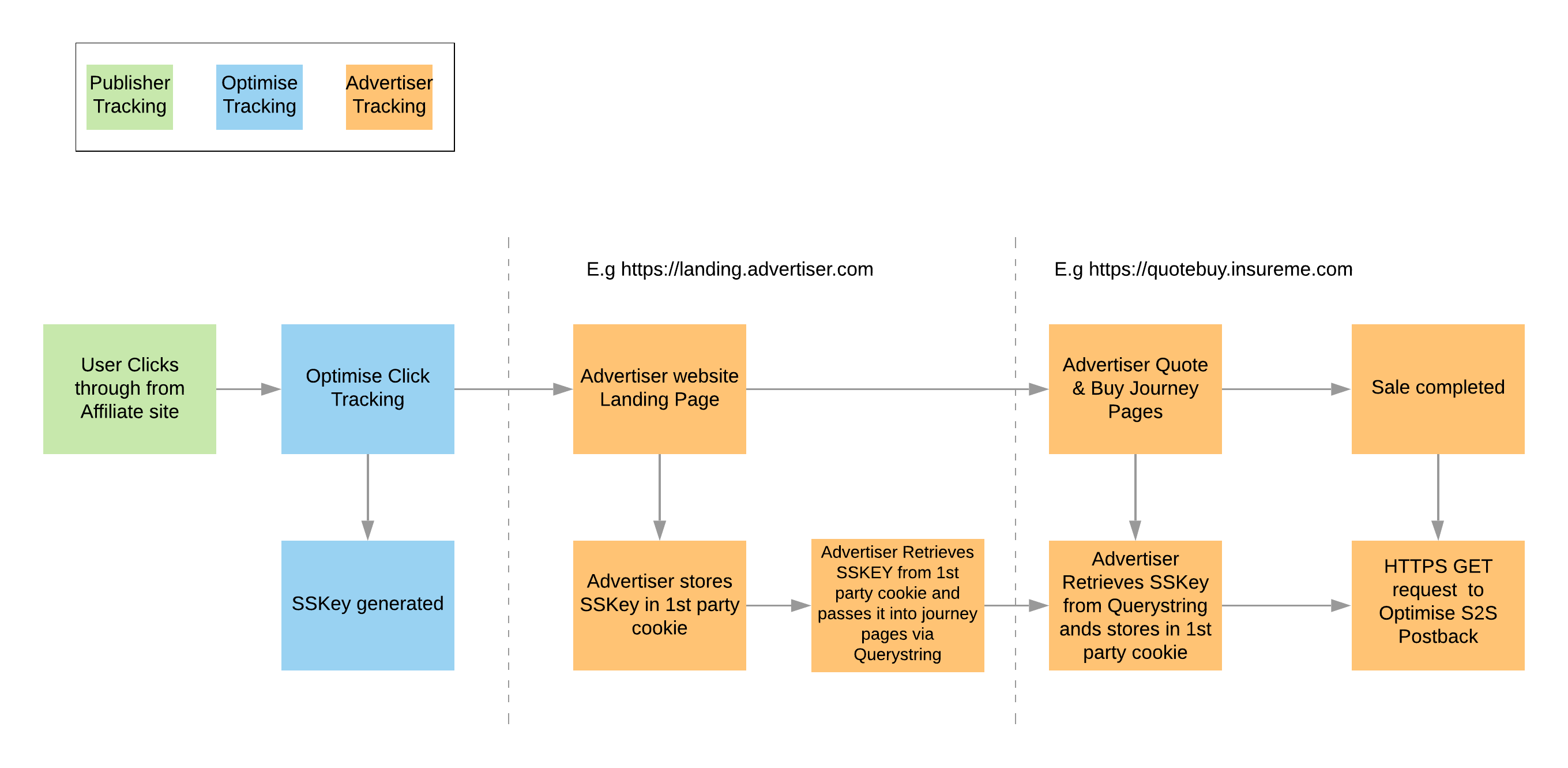
Capture sskey
An sskey (unique) click reference will be automatically be appended to every link to the landing page (or deep link) defined for the campaign. See the below examples:
Website:
https://www.advertiser.com/?sskey=86a0a0b15e0143c8a14bd9c25628aecb
Mobile App:
mobileapp://home?sskey=86a0a0b15e0143c8a14bd9c25628aecb
To capture the sskey, it must:
- Be retrieved from the landing page query string.
- Stored in a local object.
- Returned to Optimise when a conversion event takes place.
- For web, this should be a persistent cookie for 30 days (or the agreed attribution window for the campaign).
- The cookie should be a 1st party, secure, server-side cookie on the primary domain (e.g., in the above example: advertiser.com).
- For Mobile Apps this must be a persistent variable in local storage for 30 days (or the agreed attribution window for the campaign).
Event Tag Setup
Add the Universal Event Tag to the HTML of every page of your site. The tags are available in your Insights account or from our Tracking Support Team.
Your Universal Tag will look like this:
<script type="text/javascript">OMID={MID};OPID={PID};ORef=encodeURIComponent(window.parent.location.href);!function(){var a=document.createElement("script");a.type="text/javascript",a.async=!0,a.src="//track.omguk.com/e/qs/?action=Content&MID=" + OMID + "&PID=" + OPID + "&ref=" + ORef;var b=document.getElementsByTagName("body")[0];if(b)b.appendChild(a,b);else{var b=document.getElementsByTagName("script")[0];b.parentNode.insertBefore(a,b)}}();</script>
-
When fired, it will create a First Party Cookie (FPC) under your domain, populating the FPC with the unique click reference (
sskey) from the query string. -
If you redirect or manipulate the landing page URL in any way you must ensure the
sskeyparameter and value pair are also passed.
For example:https://www.advertiser-website.com/?sskey={sskey}
Conversion Postback Setup
The postback must be activated on the post-sale confirmation page of your site with the sskey from the cookie. This will capture and attribute sales upon a completed transaction.
A unique identifier needs to be generated which can be used to validate sales on. This will populate the AppID parameter for each transaction, ensuring accurate attribution.
- All endpoints support
POSTrequests with parameters provided in JSON format in the request body. - The body parameters are identical to the query string parameters.
- If the same parameter is provided in both the query string and the body, the body value takes priority.
- Below is an example of a built
GETorPOSTrequest.
https://track.omguk.com/e/s/s2s/?AppID={SaleReference}&MID={MID}&PID={PID}&Action=Sale&Status=&TransactionValue={TotalOrderValue}&sskey={sskey}&Channel=Optimise&CustID={CustomerID}&Vcode={VoucherCode}
- For a full list of all available parameters and values, please visit the Parameters section.
{MID}and{PID}need to be replaced with actual values. These will be provided by Optimise or can be found in the Setup Wizard.
Additional parameters, such as Basket Item Tracking may be appended to the URL as seen in the below Conversion Postback examples.
If not already, our Universal Tag should be added to every page on your campaign's journey to take full advantage of Optimise reporting capabilities, which include benefits like Market Intelligence and cross-device attribution (using CustID).
Conversion Postback Examples
Finance
https://track.omguk.com/e/s/s2s/?AppID={SaleReference}&MID={MID}&PID={PID}&Action=Sale&Status=&TransactionValue={TransactionOrderValue}&iPurpose={PurposeOfLoan}&iDuration={DurationOfLoan}&Vcode={VoucherCode}&Channel={Channel}&iMeta={Meta}
Insurance
https://track.omguk.com/e/s/s2s/?AppID={SaleReference}&MID={MID}&PID={PID}&Action=Sale&Status=&TransactionValue={TransactionOrderValue}&iPolicytype={PolicyType}&iPolicyValue={PolicyValue}&iStartDate={StartDate}&iEndDate={EndDate}&iPolicySpecific={PolicySpecific}&iPaymentType={PaymentType}&Vcode={VoucherCode}&Channel={Channel}&iMeta={Meta}
Retail
https://track.omguk.com/e/s/s2s/?AppID={SaleReference}&MID={MID}&PID={PID}&Action=Sale&Status=&TransactionValue={TransactionOrderValue}&Shipping={ShippingValue}&Tax={TaxValue}&iID={SKU}&iName={ItemName}&iVol={ItemVolume}&iVal={ItemValue}&iCategory={ItemCategory}&iBrand={ItemBrand}&Vcode={VoucherCode}&Channel={Channel}&CustType={CustomerType}